# System configuration and administration
**Context:** Setup form under System Configuration.
**Key Components & Elements:**
**Top Navigation Bar:**
- - **Users:** Switches to user management and account creation.
- **Financial Institutions:** Active section tab highlighting financial entity settings.
- **Data Lots:** Navigates to unit and data lot configuration.
- **General Configuration:** Opens system parameters and precision controls.
- **Licence**: Module where the Fintecor licence file is installed.
- **Reporting Set Updates:** module where signed Fintecor reporting set packages are previewed and imported.
# User Access & Role-Based Permission
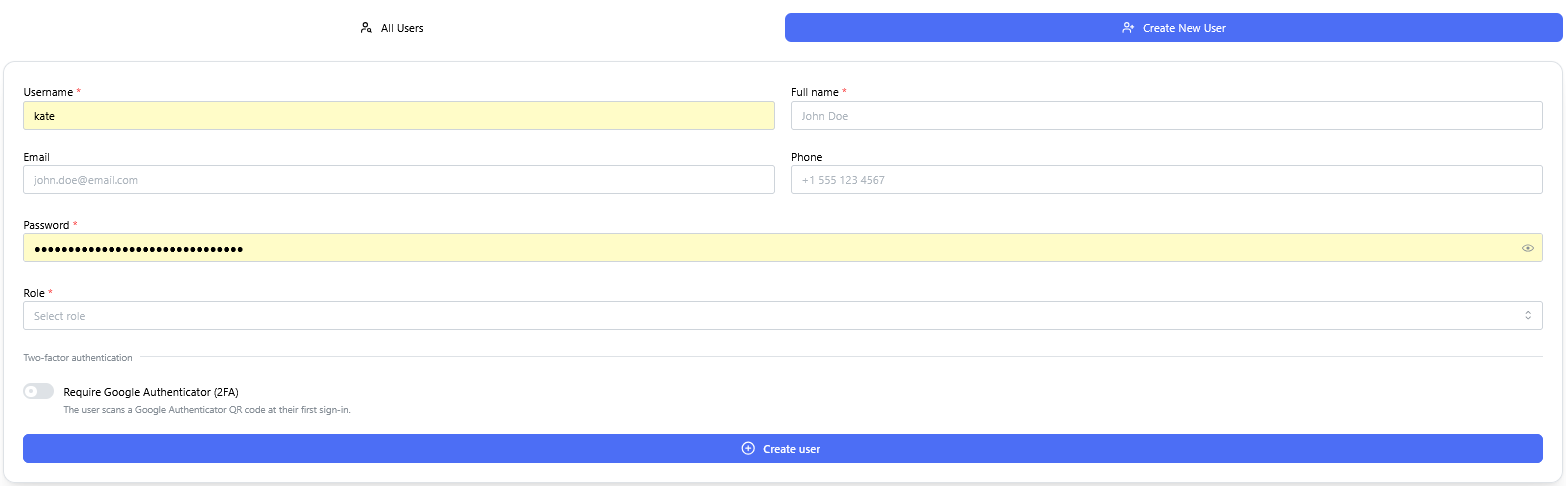
There are two roles possible, Admin and User.
**Context:** Interface for provisioning new user accounts and assigning permissions within the system.
- **Key Components & Elements:**
- **User Detail Input Fields:** Captures essential user profile information, including username, full name, email address, phone number, and account password.
- **Role Assignment Controls:** Configures access privileges with options to assign either **Admin** or **User** system roles.
- **Security & Authentication Options:** Includes a toggle/checkbox option to enforce Google Authenticator (2FA) multi-factor authentication upon login.
[](https://docs.fintecor.com/uploads/images/gallery/2026-09/image-13.png)
# Financial institution configuration
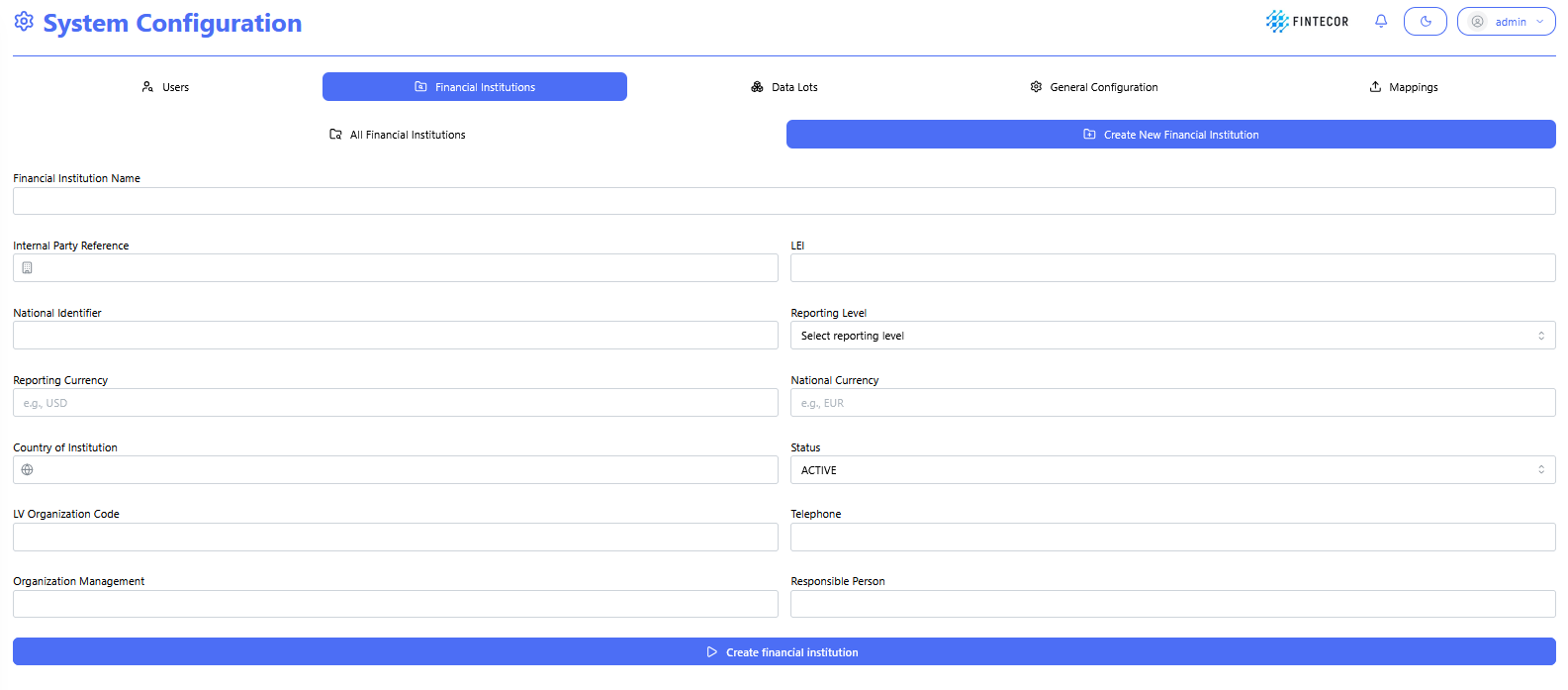
**Context:** Interface within the System Configuration module where Financial institutions are defined and created.
**Key Components & Elements:**
- **Sub-Navigation Controls:**
- **All Financial Institutions:** Switches back to the list/grid view of existing entities.
- **Create New Financial Institution:** Active sub-tab highlighting the entity creation form.
- **Input Fields:**
- **Financial Institution Name:** Text input for entering the official legal entity name.
- **Internal Party Reference:** Text field for entering internal system mapping IDs or codes.
- **LEI:** Text field for entering the Legal Entity Identifier.
- **National Identifier:** Text field for specifying national regulatory registration numbers.
- **Reporting Level:** Dropdown menu to choose the consolidation scope (e.g., Individual/IND, Consolidated).
- **Reporting Currency:** Text input specifying the primary reporting currency code (e.g., EUR, USD).
- **National Currency:** Text input specifying the local operating currency code.
- **Country of Institution:** Text/search input to define the home country jurisdiction.
- **Status:** Dropdown menu to set the operational state (e.g., ACTIVE, INACTIVE).
- **LV Organization Code:** Text field for local Latvian organizational code tracking. Used for local reporting submission.
- **Telephone:** Contact phone number input. Used for local reporting submission.
- **Organization Management:** Text field for listing key executive/board metadata. Used for local reporting submission.
- **Responsible Person:** Text field to assign a primary compliance/reporting contact. Used for local reporting submission.
- **Primary Action Button:**
- **Create financial institution:** Submits the form and saves the new entity record into the system database
[](https://docs.fintecor.com/uploads/images/gallery/2026-09/image-14.png)
**Context:** Administrative overview table displaying configured financial institution records, their regulatory parameters, and row-level management actions.
**Key Components & Elements:**
**Sub-Navigation Controls:**
- - **All Financial Institutions:** Active view tab displaying all registered entities.
- **Create New Financial Institution:** Action button to navigate directly to the entity creation form.
- **Data Grid Columns:**
- Displays ID, Name, Ide Internal Party Reference, LEI, National Identifier, Reporting Level, Reporting Currency, National Currency, Country, Status, LV Organization Code, Organization Management, Responsible Person, Telephone, Modified timestamp/user, and Created timestamp/user.
- **Row Action Buttons:**
- **Delete:** Red button with trash icon to permanently remove the financial institution record.
- **Edit (Pencil Icon):** Blue circular button to open the entity details in edit mode.
[](https://docs.fintecor.com/uploads/images/gallery/2026-09/image-15.png)
# Data lots configuration
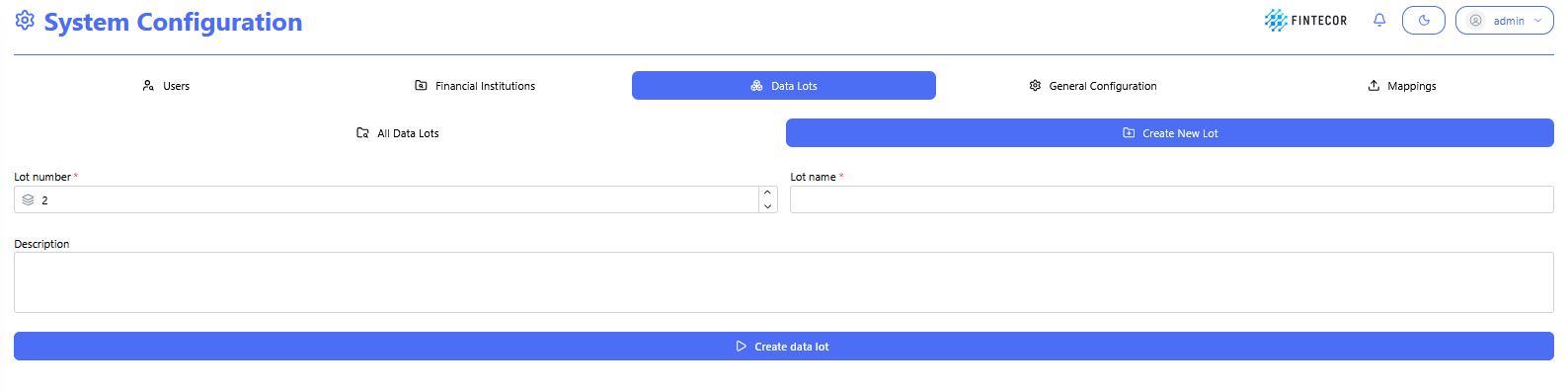
**Context:** Interface within the System Configuration module where new Data Lots are defined and created.
**Key Components & Elements:**
**Sub-Navigation Controls:**
- - - - **All Data Lots:** Button/tab to return to the list view of all existing data lots.
- **Create New Lot:** Active sub-tab displaying the new data lot setup form.
- **Input Fields:**
- \**Lot number :* Numeric input/spinner control to assign a unique numerical sequence ID for the lot.
- \**Lot name :* Text input control to give the data lot a descriptive title.
- **Description:** Multi-line text area to specify details or notes about the data unit.
- **Primary Action Button:**
- **Create data lot:** Submits the parameters to create and store the new data lots.
[](https://docs.fintecor.com/uploads/images/gallery/2026-09/1h4image.png)
# General Configuration
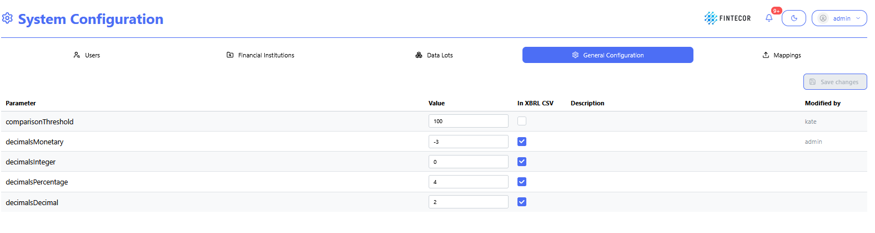
**Context:** general configuration workspace to define used parameter values.
**Key Components & Elements:**
**General Configuration** is highlighted.
- **Parameter Form Controls:**
- **Parameter Column:** Displays available parameters list.
- **Value Inputs:** Input fields to define parameter value.
- **In XBRL CSV Checkboxes:** Toggles specifying whether each parameter value used for xbrl-csv purposes.
- **Description Column:** Shows explanations for each parameter key.
- **Modified by Column:** Displays audit metadata for the last user who updated the row.
- **Action Buttons:**
- **Save changes:** Primary action button (top-right of the form) to persist modified parameters to the server.
**Action Controls:** Features a "Save changes" button in the upper-right area to apply updated parameter configurations.
[](https://docs.fintecor.com/uploads/images/gallery/2026-09/e20image.png)
# System Logs & Revision History
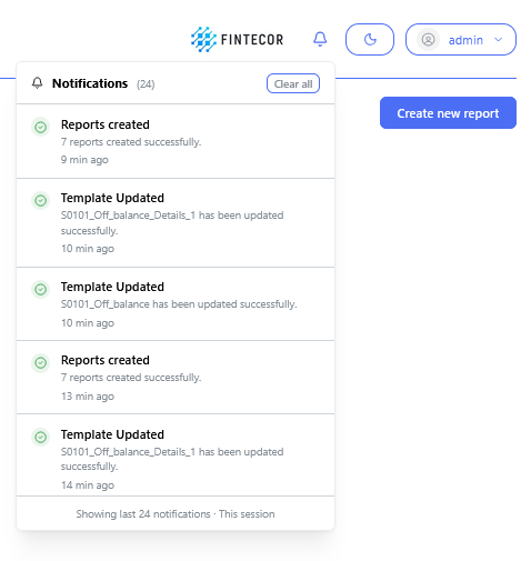
**Context:** Visual representation of system activity surfaced through the notification interface and execution status indicators.
- **Key Components & Elements:**
- **Activity & Audit Stream:** Displays recorded events including configuration changes, user logins, and system operations.
- **Background Job Status:** Shows in-progress indicators and status updates for asynchronous background processes and scheduled tasks.
- **Notification Center Interface:** Illustrates how server-side logs and operational events are presented within the application UI.
- *Most system logs are kept server side not UI side.*
[](https://docs.fintecor.com/uploads/images/gallery/2026-09/539image.png)
# Licence
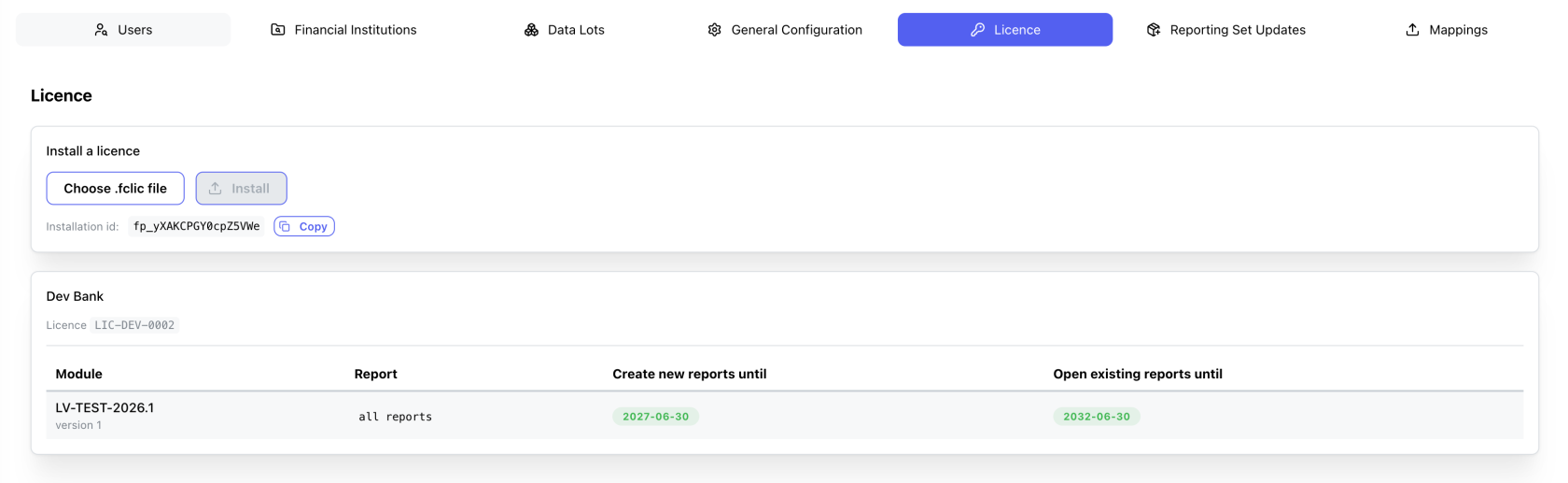
Interface within the System Configuration module where the Fintecor licence file is installed and the reports it permits are listed.
[](https://docs.fintecor.com/uploads/images/gallery/2026-10/image.png)
**Key Components & Elements:**
**Install a licence**
- Choose .fclic file: Opens a file picker for the licence file supplied by Fintecor. Accepts `.fclic` and `.txt`. Displays the selected file name once chosen.
- Install: Uploads and installs the selected licence file. Disabled until a file is selected.
- Installation id: Read-only identifier of this installation, quoted to Fintecor when requesting a licence. Each installation has its own value.
- Copy: Copies the installation id to the clipboard.
**Licence summary (shown once a licence is installed)**
- Customer name: The organisation the licence was issued to.
- Licence: The licence identifier issued by Fintecor.
- Create new reports until:\*\* Date after which new reports can no longer be created from this module.
- Open existing reports until:\*\* Date after which existing reports can no longer be opened or exported. Shows `No end date` when the grant has no limit.
# Reporting Set Updates
Interface within the System Configuration module where signed Fintecor reporting set packages are previewed and imported. The package is checked and previewed first; nothing changes until the plan is confirmed.
[](https://docs.fintecor.com/uploads/images/gallery/2026-10/XBtimage.png)
**Package Selection**
Choose .fcpkg package: Opens a file picker for the package supplied by Fintecor. Accepts `.fcpkg` and `.zip`. The preview runs automatically once a file is selected.
Re-check: Re-runs the preview for the selected package without importing anything.