
Financial institution configuration
-
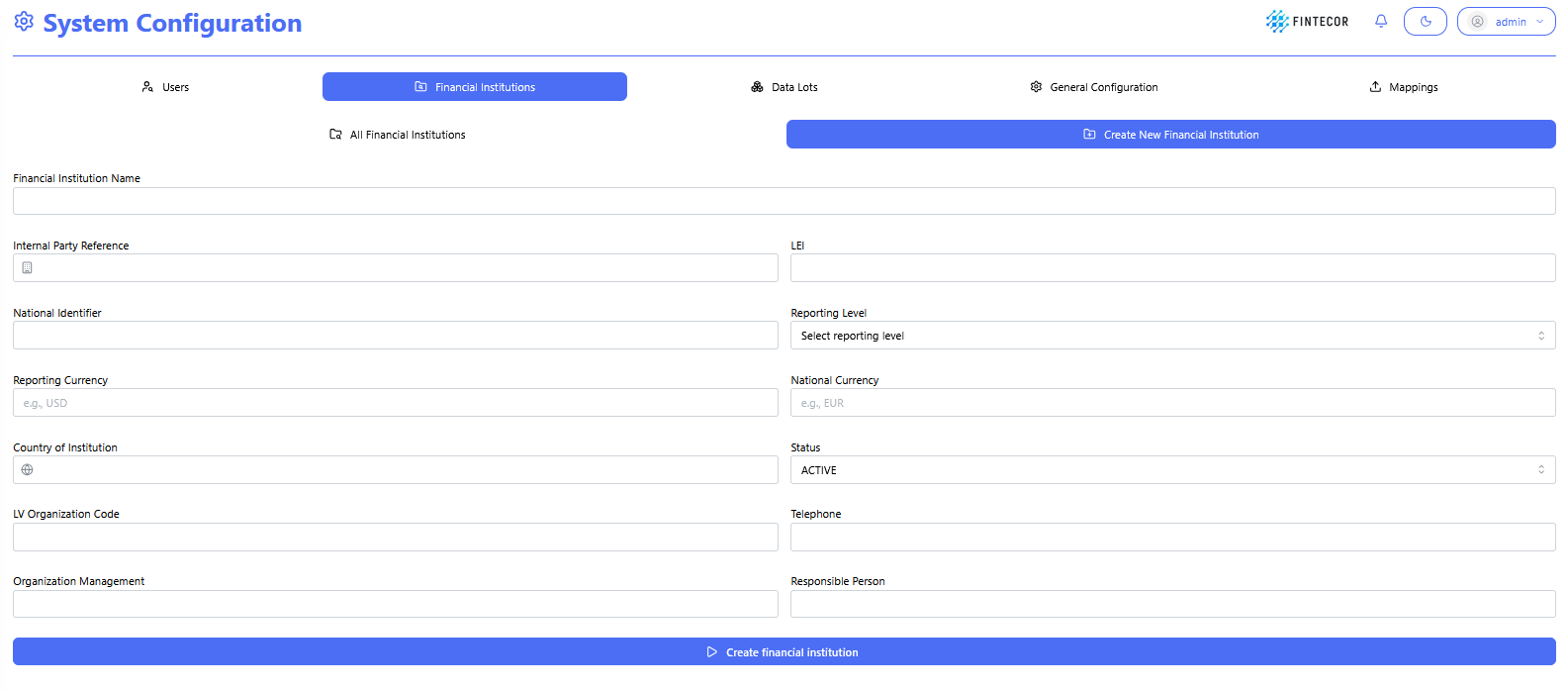
Sub-Navigation Controls:
-
All Financial Institutions: Switches back to the list/grid view of existing entities.
-
Create New Financial Institution: Active sub-tab highlighting the entity creation form.
-
-
Input Fields:
-
Financial Institution Name: Text input for entering the official legal entity name.
-
Internal Party Reference: Text field for entering internal system mapping IDs or codes.
-
LEI: Text field for entering the Legal Entity Identifier.
-
National Identifier: Text field for specifying national regulatory registration numbers.
-
Reporting Level: Dropdown menu to choose the consolidation scope (e.g., Individual/IND, Consolidated).
-
Reporting Currency: Text input specifying the primary reporting currency code (e.g., EUR, USD).
-
National Currency: Text input specifying the local operating currency code.
-
Country of Institution: Text/search input to define the home country jurisdiction.
-
Status: Dropdown menu to set the operational state (e.g., ACTIVE, INACTIVE).
-
LV Organization Code: Text field for local Latvian organizational code tracking. Used for local reporting submission.
-
Telephone: Contact phone number input. Used for local reporting submission.
-
Organization Management: Text field for listing key executive/board metadata. Used for local reporting submission.
-
Responsible Person: Text field to assign a primary compliance/reporting contact. Used for local reporting submission.
-
-
Primary Action Button:
-
Create financial institution: Submits the form and saves the new entity record into the system database
-
Context: Administrative overview table displaying configured financial institution records, their regulatory parameters, and row-level management actions.
Key Components & Elements:
Sub-Navigation Controls:
-
-
All Financial Institutions: Active view tab displaying all registered entities.
-
Create New Financial Institution: Action button to navigate directly to the entity creation form.
-
-
Data Grid Columns:
-
Displays ID, Name, Ide Internal Party Reference, LEI, National Identifier, Reporting Level, Reporting Currency, National Currency, Country, Status, LV Organization Code, Organization Management, Responsible Person, Telephone, Modified timestamp/user, and Created timestamp/user.
-
-
Row Action Buttons:
-
Delete: Red button with trash icon to permanently remove the financial institution record.
-
Edit (Pencil Icon): Blue circular button to open the entity details in edit mode.
-
