General Configuration
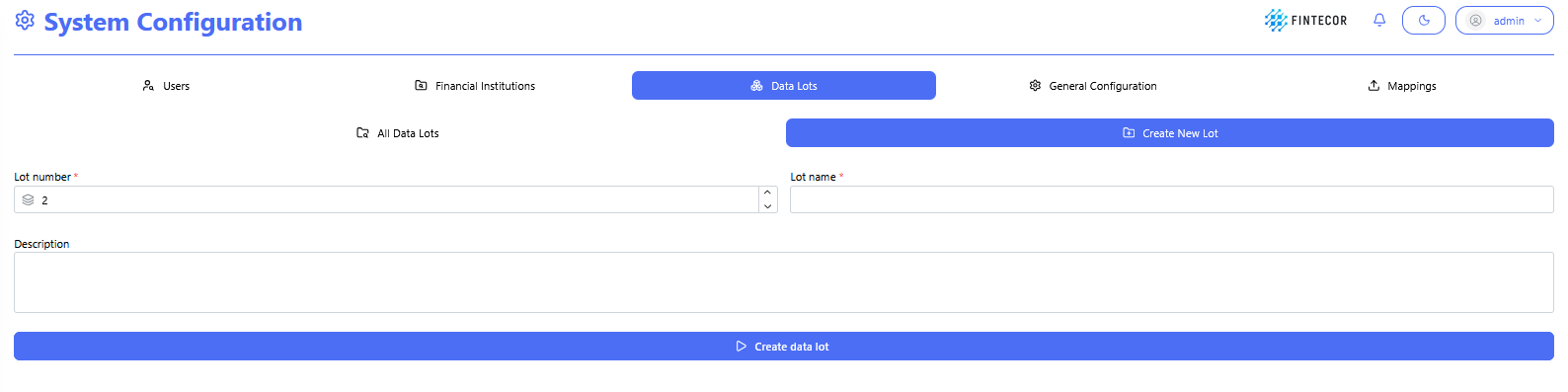
Context: Interface within the System Configuration module where new Data Lots are defined and created.
Key Components & Elements:
All Data Lots: Button/tab to return to the list view of all existing data lots.
Create New Lot: Active sub-tab displaying the new data lot setup form.
Input Fields:
*Lot number : Numeric input/spinner control to assign a unique numerical sequence ID for the lot.
*Lot name : Text input control to give the data lot a descriptive title.
Description: Multi-line text area to specify details or notes about the data unit.
Primary Action Button:
Create data lot: Submits the parameters to create and store the new data lots.
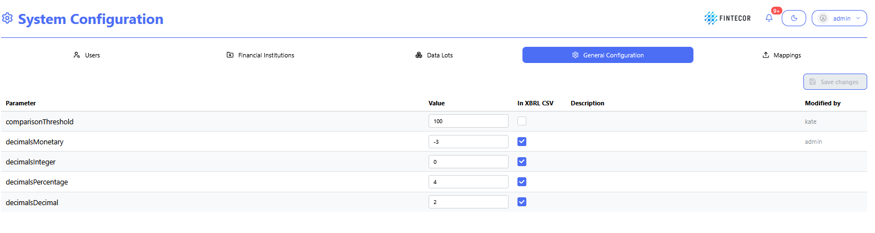
Context: Central configuration workspace showing general platform settings, calculation parameters, and output decimal formatting rules.
Key Components & Elements:
General Configuration is highlighted.
Action Controls: Features a "Save changes" button in the upper-right area to apply updated parameter configurations.